

Contractor Lic. No. 940822 | Security Lic. No. ACO1290
© Copyright 2026 SEBASTIAN. All rights reserved.
If you’re still relying on traditional locks and keys, you know the frustrations: lost keys, unauthorized copies, no access tracking, and costly rekeying whenever employees leave. Door access control systems eliminate these issues while giving you complete control over facility security.
Many business owners hesitate simply because they don’t understand how these systems work. This guide explains how access control operates and what to consider when choosing the right solution for your business.
Door access control systems regulate who can enter your facility and when. Replacing traditional keys, they use credentials like cards, fobs, PINs, or biometrics verified by electronic readers. With secure locks, a central controller, and management software, administrators gain full control over permissions and real-time activity.
This centralized system ensures only authorized access, streamlines entry, and strengthens overall safety and operational efficiency.
Door access control systems do more than keep intruders out; they give your business control that protects assets and reduces liability. Restrict sensitive areas to authorized personnel, track entry with audit trails, and eliminate rekeying costs.
By enhancing compliance, reducing theft, and improving efficiency, access control delivers smart, scalable risk management for businesses handling sensitive data, valuable inventory, or regulated operations.
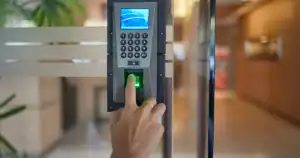
Understanding how a secured door works makes access control clear. A user presents a card, fingerprint, or PIN to the reader, which sends data to the controller for verification.
If authorized, the lock releases briefly; if not, it stays locked. Each attempt is logged, ensuring seamless, secure access.
Card-Based Systems. The most common choice for commercial use. Proximity cards or fobs use RFID technology for contactless entry, while smart cards add encryption for stronger security. They balance convenience, cost, and reliability.
PIN Code Systems. Users enter a numeric code on a keypad. Affordable and simple, but less secure since codes can be shared or seen. Best paired with cards for two-factor authentication in high-security areas.
Biometric Systems. Use fingerprints, facial, or iris recognition for identity verification. Highly secure because credentials can’t be lost or duplicated. Higher costs make them ideal for sensitive zones, not every door.
Mobile Access. Lets employees use smartphones as credentials via Bluetooth or NFC. Gaining popularity for eliminating card management and integrating easily with cloud-based systems.
Time-Based Access. Set precise access schedules. Employees may enter weekdays from 7 a.m. to 6 p.m., while cleaning crews have access only evenings or weekends, automatically enforced by the system.
Area Restrictions. Control who can enter specific spaces. Staff access shared areas, managers reach restricted zones, and only IT can enter the server room.
Temporary Access. Simplify contractor and visitor management with credentials that automatically expire after a set period; no need to retrieve or deactivate them.
Remote Management. With cloud-based systems, grant or revoke access anytime, anywhere. Instantly disable credentials when employees leave to prevent unauthorized entry.
Choosing a system that fits only your current setup leads to costly upgrades as you add doors, sites, or staff. Plan for growth early to protect your investment.
Lack of integration causes management headaches. Connect access control with video, alarms, and HR systems to link events, enhance security, and automate employee onboarding and offboarding.
Without clear procedures for issuing, tracking, and deactivating credentials, your digital system becomes as disorganized as a key ring. Strong user management keeps security effective and efficient.
Number of Doors and Users. System capacity depends on both. Count current and future doors to avoid outgrowing your setup. A 10-door, 50-user system won’t scale with expansion.
Level of Security. Needs vary by business and area. Retail spaces differ from pharmaceutical or financial facilities. High-security zones may require biometrics or multi-factor authentication, while standard offices suit card systems.
Integration Needs. Ensure compatibility with existing video or alarm systems. Integration creates a unified security ecosystem instead of disconnected tools.
Compliance Requirements. Regulated industries must meet specific standards. Healthcare follows HIPAA; financial institutions have their own mandates. Know your compliance obligations before choosing a system.
Budget Considerations. Balance upfront cost with long-term savings. Advanced systems may cost more initially but reduce rekeying, security incidents, and maintenance over time.
Management Preferences. Choose between cloud-based or on-premise control. Cloud offers remote access and automatic updates; on-premise provides full control but needs more IT support.
Support Availability. Reliable local support is crucial. When issues arise, quick assistance beats waiting in a distant call center queue.
Door access control systems go beyond basic security, providing operational control, compliance support, audit tracking, and confidence in knowing who enters your facility. Understanding how they work, from instant credential checks to advanced permission management, helps you choose a system that protects your business today and scales for tomorrow.
Sebastian has been designing and installing commercial security systems across California’s Central Valley since 1946. Our team can assess your facility, explain your options clearly, and recommend solutions that fit your needs and budget.
Contact us at (559) 316-5179 or visit our website to get started.



Contractor Lic. No. 940822 | Security Lic. No. ACO1290